ATV4Mac runs Apple TV Take 2 on your Mac
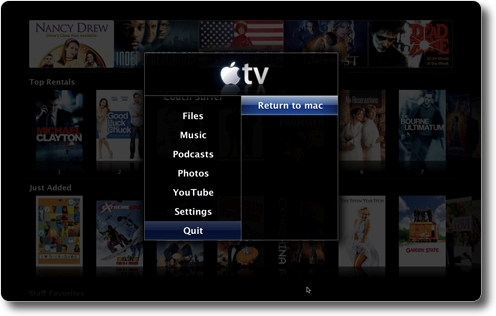
Got an itch to run Apple TV Take 2 on your Mac? The guys at MacGeek have just released ATV4Mac 1.3 that allows you to run Apple TV Take 2 on your Mac. It is basically a Front Row replacement with Apple TV frameworks.

A few caveats though. ATV4Mac only works with Mac OS X 10.4.8 - 11 at the moment. Also, the resolution is fixed to 1280 x 800. Lastly, quitting the application doesn’t return the resolution back to the original settings.
So if you still haven’t upgraded to Leopard or have a Tiger partition, give this application a try. It’s almost like running the real thing.
Tuesday 18 Mar 2008 | | Del.icio.us | News


March 18th, 2008 at 11:20 am
Will it play HD protected content like the ATV does? I thought the HD content needed HDMI?
March 18th, 2008 at 3:30 pm
I’d like to know the same thing.
But as for HDMI is required. I have my ATV connected to my HDTV via component and the iTunes HD rentals play fine.
Also, HDMI isn’t what is protecting the digital content, it is HDCP, which BTW has been supported on DVI for a long long time.
March 18th, 2008 at 5:26 pm
Nice idea if you are using a mini as a media center.
March 25th, 2008 at 12:49 pm
If I use this ATV4Mac 1.3 can I proceed with using other hacks on this website as if I had an ATV?
April 3rd, 2008 at 1:14 pm
Seriously, I got Leo, and I´m not gonna downgrade to Tiger, even on another disk!
Can´t they make it on leo to?
April 23rd, 2008 at 9:24 pm
Problem: when you quit the appleTV console, and get back to OSX you can’t get back to appleTV again…. it just won’t work. Bad thing… must restart user session!
One other thing: YOU CAN’T UNINSTALL IT once you try it!
Beside of that, cool app.