Get color output from Apple TV’s composite video output
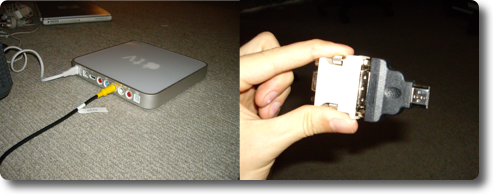
Mauricio Pastrana has figured out how to get color output via the composite video connector. This is good news for people who want to use the Apple TV with regular non-HD TV sets.
Here’s what he did:
- Plug your composite-yellow in the green “slot” (this will give you an image, but BW)
- head over to resolution and set it to 480i (not sure if this step is needed tho)
- now STAND on 480p and unplug the composite-yellow, plug an HDMI-DVI adapter
- press “ok” on the remote and count to 5
- unplug the HDMI-DVI adapter and replug the composite-yellow, when the image comes back, it comes back full color!
Great job, Mauricio.
Update:
As noted in one of the comments, you can also enable composite video via software using instructions found here.
Thanks, drag0n.
Friday 12 Oct 2007 | | Del.icio.us | News, Hardware Hacks, How To


August 20th, 2008 at 6:10 am
CONFIRMATION in Apple 2.1. it works also with HDMI(male)-DVI(female) only (pins 16 and 14 short circuited with paperclip
) only thing you need is to follow yellow light in front is becoming white after plugging in the adapter - basically when resolution is changed after no confirmation (new future in latest firmware). I am not sure about the sequence of replugging green and removing adapter, but there are only two options luckily and the original worked for me.
July 13th, 2008 at 8:55 pm
Just updated to 2.1 and the HDMI-DVI-VGA trick works just fine.
but just like 2.0.2 you have to plug the green back in before removing the adapter.
And now internet Radio seems to work as expected, I hope they won’t vanish like on 2.0.2 and need a re-sync.