Apple TV as an in-car entertainment system

by luck on October 5, 2007

Apple TV Entertainment System

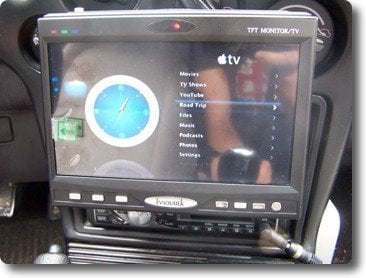
Brandon Holland, the Canadian dude that gave us the wireless keyboard hack, is determined to get the most out of his Apple TV. So he turned it into an in-car entertainment system, complete with a custom GPS plugin that he wrote himself.

His email wrote:

I just recently finished putting an Apple TV into my car which is a 1990 Eagle Talon nicknamed “The Zapper” (Watch Futurama). The component output of the Apple TV is converted to composite using SVideo.com’s Component to RCA convertor. The output of the convertor is then displayed on my in-Dash 7-inch LCD. The audio is plugged into the aux of my deck. The Apple TV and video convertor are both run off of my 300-watt invertor hidden beneath the dash. The screen and the Apple TV are powered on and off using switches. I also wrote a GPS plugin for the Apple TV called Road Trip. It uses my USB GPS device to display its current location on a map. I am hoping to have the plugin online very soon. All of the media content on the Apple TV gets synchronized to my iTunes via wifi as soon as I park my car in the drive way! Everything works great!

Thanks, Brandon. Now, don’t you be watching any shows while driving, you hear?

  • dave
    Off the heasy.
  • Justin
    Oh i can't wait for that plugin that would be perfect for my Audi A3 show car. if you need any help beta ing that plugin let me know.
  • Pete
    This is awesome. Please talk him into doing a how-to or at least providing a parts list for this hack. I would LOVE to start working on it.
  • TheDude
    This is sweet!!! I was looking at a mini mod for my car but this is much better!

    I second the request for a how-to and parts list!

    Awesome job!
  • As requested, A quick parts list:

    -Apple TV (duh!)
    -Vehicle
    -LCD, I used a 7-inch Innovatek console LCD.

    -DC-AC power invertor or a DC-DC Power supply from:
    http://mikegyver.com/IdeasnProducts/AppleTV/ind...

    -SVideo.com's component to composite convertor:
    http://www.svideo.com/appletv2tv.html

    -Audio LR to stereo mini cable
    -Component video cables (RGB)
    -Lots of wire
    -Fusable link between battery and invertor
    -Optional: switches, velcro straps for mounting.

    Thats a basic parts list. If anyone needs any help or more
    information, feel free to e-mail me.
  • J3G
    AppleTV : $299 + $129 = $430
    Mac Mini Core Duo: = $400

    guys, I've been down this road too many times. Unfortunately, AppleTV is not worth it to put into the car because of the required component converter ($129!!!). A mac mini from ebay will run you $400 (for dual core!). Also carnix makes an amazing power supply exclusively for the mac mini that will SLEEP it on/off in conjunction with the car! How cool is that!?! So my main complaint is that for the same price you can have a mac mini. But the mac mini gives you so much more: bluetooth, more hard drive space, more USB ports, DVD player, and the WHOLE OS X with all its flexibilities. One other amazing thing to do with the mac mini? Hide it in a glove box and use bluetooth to control it. What is the best/cheapest bluetooth controller??? A Nintendo wii remote :)
  • Fraser Horn
    I have done the same thing in my Expedition using a 15" overhead screen for the kids in the back and a Panasonic head unit with screen for the front. I can use the steering wheel buttons to control the Apple TV using PAC's universal steering wheel control interface. Works great. I am in the process of adding a smart DC power supply to get rid of the inverter and to allow the Apple TV to stay on for syncing without draining the battery. The best thing about the Apple TV over the Mini for the car is it doesn't require any maintenance, it's auto syncing, and no keyboard or mouse is required. I will add a rear view camera so I can see behind when the 15" screen is down.
  • bonnie
    Dear sir/madam,

    XCarlink is a car kit. It plays audio and video files via USB flash disks and SD memory cards as input devices. It also has a Bluetooth A2DP input socket for Bluetooth handsfree car kit. It can be easily installed in various car models, including those from Audi, Citroen, Fiat, Ford, Honda, Hyundai, Mazda, Peugeot, Renault, Toyota, Volkswagen.

    1. Support files: DVD-Video, DivX 3.11/4.x/5.x, Xvid, SVCD, VCD 1.1/2.0, MPEG-1, MPEG-2, JPEG, MP3, WAV
    2. standard handsfree car kit, support A2DP for stereo music streaming! 3. Microphone inside. Answer a phone call!

    Usage:
    1. Turn off the power, install the interface.
    2. Power on, access to MP4 mode. Play MP4, controll from car radio buttons.
    3. Connect Bluetooth handsfree car kit, Press the button for few seconds to match Bluetooth device state. Enter Pin code: 1234.
    4. When call comes in, press the button first time to answer, hold on 3 seconds to refuse. In music streaming mode, press button to Pause or Play.

    If you are interested,please contact me.
    Best regards,
    Bonnie

    ****************************************************
    Email: xcar8102@xcarlink.com
    Tel: 0086-755-26767011-8102 Fax:86-755-26767618
    Sales department
  • greg s.
    there is a converter for apple tv component video output to s-video at svideo.com
  • Dear Valued dealers,

    We come from IPPEC , we are a professional manufacturer of car audio with powerful R&D ability.
    We are a well-known factory in China.

    This is Ms. Helen, It is my pleasure to introduce our company www.ippec.com to you:

    Our Main products:
    â–² 7" one/two Din GPS&DVD all in one unit
    â–² 3.5"/4.3"/7" PMP GPS
    â–² Car DVD players
    â–² Car PC and monitors

    For more detail information about us, pls click the picture for the link of our website.


    Will this super product be popular in your country market?

    Try to contact with me ASAP if you have any interest, You can enjoy the best prices and fast delivery!

    Best regards
    IPPEC
    Ms. Helen Lee

    Brand website : www.ippec.com
    Business Hotline: 0086-756-6110111
    Business eMail: sales@ippec.com
    sales@vip-tech.net
blog comments powered by Disqus